

교육 양식
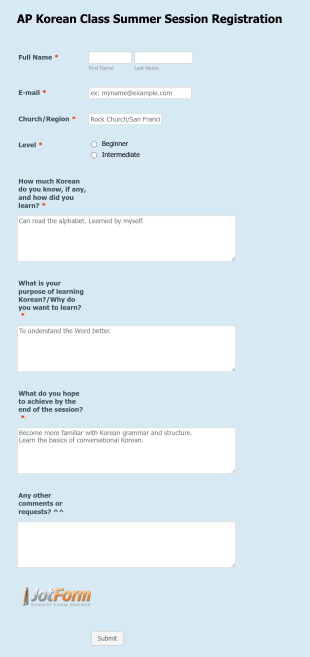
AP Summer Korean Class Registration
A simple educational form of class registrations for an AP Summer Korean Class
카테고리로 이동:교육 양식
온라인 지식 퀴즈 설문
온라인 종합 상식 퀴즈 양식은 학교, 학원, 동아리, 사내 교육에서 객관식 퀴즈를 온라인으로 진행하고 결과용 데이터 수집과 양식 제출물 관리를 간편하게 할 수 있도록 돕습니다.
카테고리로 이동:퀴즈들

시험 일정 제출 설문
시험 일정 제출 양식으로 시험 계획을 접수하고 조직별 일정 조율을 간편하게 진행하세요. Jform 양식 템플릿과 코드 없이 양식 빌더로 데이터 수집과 양식 응답 관리를 한곳에서 처리할 수 있습니다.
카테고리로 이동:시험 양식
문법 퀴즈
한국어 문법 퀴즈 양식으로 학습자의 문법 이해도를 온라인에서 빠르게 점검하고, 수업 진단 평가나 복습 과제에 활용할 수 있도록 Jform으로 맞춤 제작해 보세요.
카테고리로 이동:퀴즈들
영어 문법 빈칸 퀴즈
영어 문법 빈칸 퀴즈 양식으로 시제와 비교 표현 등 핵심 문법을 빠르게 점검하고, 학교나 학원 수업의 진단 평가와 복습 퀴즈에 활용해 응답 기반으로 학습 보완 포인트를 파악하세요.
카테고리로 이동:퀴즈들

어휘 정의 퀴즈
어휘 정의 퀴즈 양식으로 학습자의 어휘 이해도와 서술 능력을 온라인에서 확인하고, 교실 수업과 과제 평가에 필요한 데이터 수집을 Jform으로 간편하게 진행하세요.
카테고리로 이동:퀴즈들
강의 콘텐츠 제작 설문
코스 콘텐츠 제작 폼으로 강의와 교육 과정 기획 정보를 한 번에 수집하고, Jform에서 양식 템플릿을 맞춤 설정해 콘텐츠 제작과 내부 검토 과정을 더 수월하게 진행하세요.
카테고리로 이동:콘텐츠 양식
자격 이의신청서
자격증 이의신청서 양식은 자격 결과에 대한 재심 요청을 온라인으로 접수하고 처리 과정을 정리하려는 기관과 교육 운영사를 위한 양식 템플릿입니다.
카테고리로 이동:항의 양식
교육 양식 정보
교육 양식은 교육 기관과 관련 조직의 다양한 업무를 간소화하도록 설계된 전문 디지털 양식입니다. 학생 등록 관리, 교직원 피드백 수집, 비교과 활동 운영 등 폭넓은 업무에 활용할 수 있습니다. 학교, 대학교, 교육 센터의 일상적인 운영에서 중요한 데이터를 수집하고 처리하며 분석하는 데 사용됩니다. 기존의 종이 기반 업무 흐름을 디지털화하여 업무 효율성을 높이고 행정 부담을 줄이며 교육 운영 전반을 더욱 체계적으로 관리할 수 있도록 지원합니다.
Jform은 교육 양식을 제작하고 관리하기에 적합한 온라인 양식 빌더입니다. 사용하기 쉬운 인터페이스를 통해 양식을 간편하게 맞춤 설정하고 데이터 수집을 자동화할 수 있어 교육 기관의 구체적인 요구에 맞게 활용할 수 있습니다. 수집된 모든 정보는 Jform 테이블에 안전하게 저장되고 체계적으로 정리되므로 필요한 데이터를 효율적으로 확인할 수 있습니다. 또한 정확한 데이터를 기반으로 종합적인 보고와 분석을 수행할 수 있어 교육자가 더 나은 의사 결정을 내리는 데 도움이 됩니다.
Why Use Education Form?
- Education Form offer unmatched accuracy in data collection, ensuring that information is captured correctly the first time. This precision eliminates the common errors associated with manual data entry, fostering reliability and trust in the data collected.
- Speed is a significant advantage of using Education Form, as they allow for rapid data gathering and processing. This expedites administrative tasks, freeing up valuable time for educators and staff to focus on more mission-critical activities.
- Professional data handling is facilitated by digital forms, which ensure that sensitive information, such as student records and feedback, is managed securely and in compliance with privacy regulations. This is particularly crucial in maintaining the integrity and confidentiality of educational data.
- The versatility of Education Form means they can be tailored to fit a wide variety of educational scenarios, from enrollment applications to event registrations. This adaptability supports diverse educational needs and ensures that forms are perfectly aligned with institutional goals.
- Automation features in Education Form reduce manual intervention, enabling educators to set up automatic notifications, approvals, and data transfers. This streamlining of processes leads to increased operational efficiency and reduced administrative overhead.
Common Problems Solved by Education Form
- One of the most significant issues in education is the reliance on paper-based systems, which are prone to errors and inefficiencies. Education Form digitize these processes, eliminating the risk of lost paperwork and ensuring that data is always accessible.
- Manual data entry is another common pain point that is effectively addressed by Education Form. By automating data collection and processing, these forms minimize human error and reduce the time spent on repetitive tasks.
- Data loss is a critical concern for educational institutions, especially when handling sensitive information. Education Form provide a secure platform for data collection and storage, thereby safeguarding against accidental loss or breaches.
- Education Form are designed to simplify complex processes, such as course registrations and feedback collection, by providing a streamlined, user-friendly interface. This simplification reduces the cognitive load on users and enhances the overall experience.
- Limited accessibility of traditional paper forms is resolved through the use of digital forms, which can be accessed anywhere and at any time, ensuring that all stakeholders have the necessary access to complete and submit forms promptly.
Matching Use Cases to Features
- The Drag-and-Drop Form Builder is ideal for customizing Education Form to fit specific needs, such as creating unique enrollment forms that capture all necessary student information. This feature allows for quick adjustments and updates, ensuring that forms remain relevant and effective.
- Conditional Logic enables the creation of dynamic forms that adapt based on user inputs, such as displaying additional fields for students who select specific courses or programs. This adaptability enhances user experience and ensures that all necessary data is collected.
- The integration with over 30 Payment Gateways, including Stripe and PayPal, allows educational institutions to collect fees directly through forms. This feature streamlines the payment process, reducing administrative tasks associated with handling financial transactions.
- Electronic Signatures, facilitated by Jform Sign, are crucial for obtaining necessary approvals and consents, such as parental permission for field trips. This feature ensures that all legal and compliance requirements are met with ease.
- The PDF Editor automatically generates professional PDF documents from form submissions, such as transcripts or certificates, ensuring that data is presented in a formal and consistent manner.
- Jform's Report Builder offers the ability to create comprehensive reports based on collected data, such as analyzing feedback from course evaluations to inform curriculum improvements.
- With offline data collection capabilities, Jform Mobile Forms ensures that data can be gathered even without an internet connection, critical for field activities or remote educational settings.
How to Create a Educations Form
- Begin by browsing the Template List for an Educations template or opt to start from a blank form.
- Customize the design and fields using the Drag-and-Drop Form Builder, tailoring the form to meet specific educational requirements.
- Once your form is ready, publish it and share it via Direct Link, Email, or Website Embed to reach your intended audience.
Top Use Cases for Education Form
- For Managers: Education Form are invaluable for managers who oversee the administrative functions of educational institutions. These forms streamline processes such as staff evaluations, budget approvals, and strategic planning, all while capturing vital data that informs decision-making. The ability to automate notifications and approvals further enhances managerial efficiency, allowing leaders to focus on broader institutional goals.
- For Teams: Educational teams, including faculty and administrative staff, benefit significantly from the use of Education Form. They facilitate collaboration through shared access to forms and data, enabling teams to coordinate activities like curriculum development, event planning, and student assessments. With integrated features like conditional logic and third-party integrations, teams can work more effectively and cohesively.
- For Customers: Students and parents, as primary customers of educational institutions, experience improved interactions through Education Form. These forms simplify processes such as course enrollment, fee payment, and feedback submission, providing a seamless user experience. The convenience of digital forms ensures that customers can engage with educational services anytime, anywhere, enhancing overall satisfaction.
Summarizing Education Form
교육 양식은 교육 분야의 데이터를 효율적이고 안전하게 관리하고 업무 절차를 간소화할 수 있는 효과적인 솔루션입니다. Jform 온라인 양식 빌더를 활용하면 교육 기관은 운영 효율성을 높이고 행정 부담을 줄이며 데이터 정확성을 개선할 수 있습니다. 결제 게이트웨이, 전자 서명, PDF 자동 생성 등의 기능도 원활하게 연동할 수 있어 현대적인 교육 업무 흐름을 구축하는 데 유용합니다.
자주하는 질문들
1) Is it free to create Education Form on Jform?
Yes, Jform offers a free plan that allows users to create and share Education Form, although there are limitations on the number of forms and submissions.
2. IT 양식은 조직에 왜 중요한가요?
Absolutely. Jform prioritizes data security, employing encryption and compliance with privacy standards to protect all submitted information.
3) Do I need coding knowledge to build a Educations form?
No coding knowledge is required. Jform's Drag-and-Drop Form Builder allows anyone to create professional forms with ease.
4. IT 양식에는 다양한 유형이 있나요?
Yes, Jform supports integration with over 30 payment gateways, enabling direct payment collection via your forms.
5. 누가 IT 양식을 사용해야 하나요?
Yes, Jform forms are mobile-friendly and can be accessed and submitted on any smartphone or tablet.
6. IT 양식은 워크플로우 효율성을 어떻게 향상시키나요?
Indeed. Jform’s PDF Editor allows you to automatically convert submissions into well-structured PDF documents.
7) How can Education Form improve student engagement?
Education Form streamline communication and feedback processes, making it easier for students to interact with educational content and services, thereby enhancing engagement.
8) Can Education Form integrate with our existing student information system?
Yes, Jform offers over 100 third-party integrations, allowing seamless connectivity with various student information systems and other educational software.