

40+ 설문지 템플릿 및 예
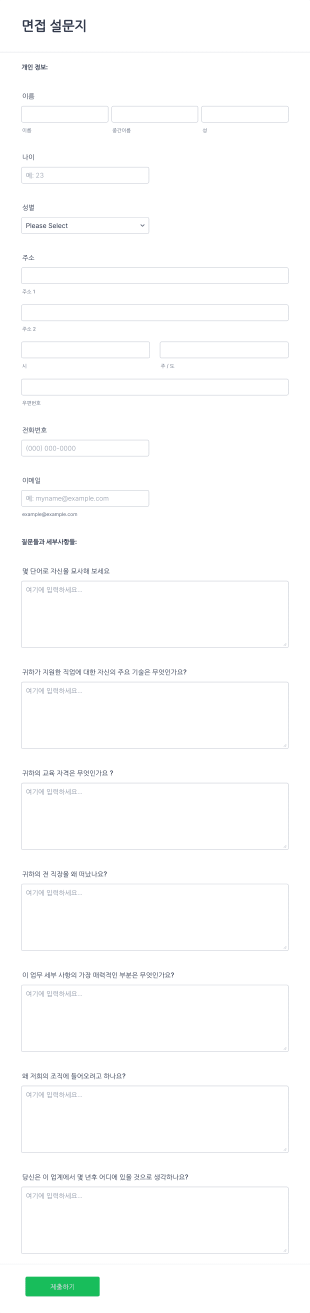
온라인 면접 설문지 양식
이 온라인 면접 설문지는 면접자의 개인 및 연락처 정보, 업무 경험, 기술 그리고 면접 질문 응답들을 수집할 수 있게 합니다. 귀하는 이 템플릿을 토대로 사용하고 다양한 맞춤 설정 위젯을 사용해서 자신만의 폼을 만들거나 로고 및 질문들을 추가하고 자신의 웹사이트에 이것을 임베드 하거나 독립적인 폼으로도 사용할 수 있습니다.
카테고리로 이동:설문지 템플릿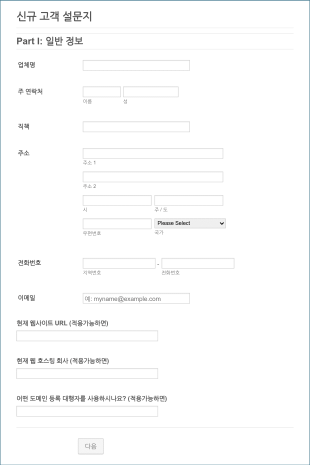
웹 디자이너 클라이언트 설문지
웹 디자이너 고객 설문지는 신규 고객들에게서 가입 정보를 수집하기 위해 웹 디자이너들에 의해 사용됩니다. 귀하는 웹 디자이너로서 이 무료 웹 디자이너 설문지로 귀하의 고객들을 위한 최고의 웹사이트를 만드는데 필요한 모든 정보를 간편하게 수집할 수 있습니다. 이 폼 템플릿은 귀하의 요구에 맞도록 간단하게 맞춤 설정될 수 있으며 웹사이트에 임베드 하거나 이메일을 통한 공유로 제출자료들이 귀하의 Jform 계정으로 바로 전송되게 할 수 있습니다. 또한 귀하는 모든 기기에서 제출된 정보에 접근할 수 있으며 이것은 이동 중에도 디자인 관련 업무를 할 수 있게 합니다. 귀하는 개인적인 감성을 더하고 싶으신 가요? 회사 로고를 추가하고 작업 사진들을 업로드하거나 글꼴과 색깔들을 변경하십시오. 정보를 더 잘 정리하고 팀과 협업하기 위해서 Slack, monday.com, Airtable, Salesforce 등과 같은 강력한 도구들로 130개 이상의 앱에 폼 제출자료들을 연동할 수 있습니다.
카테고리로 이동:설문지 템플릿
일반 상식 퀴즈
일반 상식 퀴즈 양식은 객관식 문제로 참여자 응답을 모아 수업, 동아리, 사내 교육, 행사 콘텐츠에 활용할 수 있도록 데이터 수집을 돕는 양식 템플릿입니다.
카테고리로 이동:퀴즈들
결혼 상대 프로필 설문
결혼 프로필 양식은 결혼을 고려한 만남을 위한 소개 정보를 수집하고 비교할 수 있게 도와주며, 결혼정보 서비스, 커뮤니티, 주선자 등이 온라인 데이터 수집을 간편하게 운영하도록 지원합니다.
카테고리로 이동:설문지 템플릿
총기 소유 인식 설문
총기 소유 태도 설문조사 양식으로 총기 소유 인식, 사회적 안전에 대한 의견, 논의 수준에 대한 평가를 온라인에서 수집해 연구 기관, 교육 기관, 커뮤니티의 데이터 수집과 분석 준비에 활용하세요.
카테고리로 이동:설문조사 템플릿
개인 진술 작성 설문
개인 간증 작성 양식은 교회와 소그룹에서 간증 글을 체계적으로 모아 온라인 데이터 수집을 돕고, Jform으로 제출물 관리와 공유를 간편하게 진행할 수 있습니다.
카테고리로 이동:설문조사 템플릿
화학 태도 설문
화학 학습 태도 설문조사 양식으로 학생들의 수업 흥미와 참여도, 이해 자신감 등 학습 태도를 데이터 수집으로 파악해 수업 개선과 연구에 활용하세요.
카테고리로 이동:설문조사 템플릿
동물 풍요로움 퀴즈
반려동물 풍부화 퀴즈 양식으로 놀이 습관과 생활 환경을 점검하고, 가정이나 돌봄 서비스에서 온라인 데이터 수집을 통해 반려동물 맞춤 활동 아이디어를 정리해 보세요.
카테고리로 이동:퀴즈들
고대 무기 퀴즈
고대 무기 퀴즈 양식은 교육 기관, 동아리, 박물관 프로그램, 역사 커뮤니티에서 참여형 데이터 수집을 진행하고 양식 제출을 모아 결과를 확인하는 데 도움이 됩니다.
카테고리로 이동:퀴즈들
학생 이야기 설문
학생 이야기 설문 양식은 학교와 교육기관이 학생의 학교생활 경험을 온라인으로 데이터 수집하고, 양식 응답을 제출물로 정리해 프로그램 개선과 상담 참고에 활용하도록 돕습니다.
카테고리로 이동:설문조사 템플릿
시장 재방송 공유 양식
시장 사례를 복기해 관찰과 배움을 공유하도록 돕는 시장 흐름 되짚어보기 공유 설문지 양식으로 스터디, 교육, 리서치 팀의 데이터 수집과 설문지 제출 관리를 간편하게 진행하세요.
카테고리로 이동:설문조사 템플릿
수집품 판매업 사업체 조사 설문
수집품 판매업체 사업 설문 양식은 수집품 판매 사업자의 운영 현황과 지원 수요를 온라인으로 데이터 수집해 분석하려는 기관과 단체에 적합한 설문 템플릿입니다.
카테고리로 이동:설문조사 템플릿
영어 교육 과제 설문
영어 수업 어려움 설문조사 양식으로 영어 교사의 수업 준비, 참여 유도, 평가와 자료 지원 필요를 온라인 데이터 수집으로 파악하고 양식 응답을 모아 개선 방향을 도출하세요.
카테고리로 이동:설문조사 템플릿
식물 수분 관찰 체크리스트
식물 수분 관찰 기록 설문 양식은 현장 관찰 데이터를 온라인으로 모아 연구자, 교육 기관, 시민 과학 팀이 식물과 꽃가루 매개자 활동을 일관되게 기록하고 비교할 수 있도록 돕습니다.
카테고리로 이동:설문조사 템플릿

어휘 학습 어려움 설문
어휘 학습 어려움 설문 양식으로 학습자의 어휘 학습 문제와 지원 필요를 파악하고, 교사와 교육기관이 데이터 수집 결과를 바탕으로 지도와 콘텐츠 개선에 활용하세요.
카테고리로 이동:설문조사 템플릿
아사이 볼 퀴즈
아사이볼 상식 퀴즈 양식으로 아사이볼의 재료, 토핑, 만드는 방법에 대한 이해도를 간단히 확인하고, 카페 이벤트나 교육형 콘텐츠에서 참여를 유도하며 Jform으로 데이터 수집을 손쉽게 관리하세요.
카테고리로 이동:퀴즈들
위원회 기대사항 설문
위원회 활동 기대사항 설문조사 양식으로 참여자의 기대와 참여 가능 여건을 수집하고, 위원회 운영 방식과 소통 체계를 개선하는 데 필요한 의견을 정리하세요.
카테고리로 이동:설문조사 템플릿
동물 성장 퀴즈
동물 성장 퀴즈 양식은 수업, 동아리, 체험학습에서 학습자의 이해도를 확인하고 결과를 데이터 수집 형태로 모아 관리할 수 있도록 돕는 Jform 양식 템플릿입니다.
카테고리로 이동:퀴즈들
항공 전력 역량 평가 설문
공군력 역량 평가 설문조사 양식으로 공군의 역할, 신뢰 수준, 소통 개선 의견에 대한 데이터 수집을 진행하고, 기관과 연구 조직이 양식 제출을 바탕으로 인식 분석과 정책 검토에 활용할 수 있습니다.
카테고리로 이동:설문조사 템플릿
캐릭터 세션 기록 양식
캐릭터 모험 기록 양식은 테이블톱 역할 놀이 모임의 회차 진행 내용을 정리하고 캐릭터 여정을 누적 관리하려는 진행자와 참여자를 위한 양식 템플릿입니다.
카테고리로 이동:설문지 템플릿
천장 단열 설문
천장 단열 조사 설문 양식으로 건물의 단열 상태와 체감 불편을 온라인으로 데이터 수집하고, 개선 필요도와 희망 시기를 기반으로 점검 및 상담 업무를 정리하세요.
카테고리로 이동:설문조사 템플릿
익명 가족 이야기 설문
익명 가족 이야기 설문조사 양식으로 가족 경험과 관계에 대한 의견을 익명으로 데이터 수집하고, Jform에서 제출물을 한곳에 모아 분석과 프로그램 기획에 활용하세요.
카테고리로 이동:설문조사 템플릿
군사 항공력 평가 설문
군사 항공전력 평가 설문조사 양식으로 이해관계자 의견을 온라인 데이터 수집으로 모아 관점별 인식을 비교하고, Jform에서 양식 제출물을 한곳에서 관리하세요.
카테고리로 이동:설문조사 템플릿설문 템플릿 및 예제들 정보
설문지 템플릿은 응답자로부터 구조화된 정보를 수집하기 위해 사전에 설계된 양식입니다. 이 템플릿은 고객 만족도 조사, 직원 참여 평가, 학술 연구, 건강 검사, 시장 조사 등 다양한 목적과 산업에 맞게 조정할 수 있습니다. 일관된 데이터 수집 구조를 제공함으로써 설문지 템플릿은 데이터 수집, 분석, 실행 가능한 인사이트 도출 과정을 간소화합니다.
With Jform, users can easily access and customize a wide range of questionnaire templates to fit their specific needs. Leveraging Jform’s intuitive drag-and-drop Form Builder, users can add or modify questions, integrate widgets, and apply conditional logic without any coding knowledge. Jform’s platform also supports seamless data collection, automatic storage, and real-time notifications, making it an ideal solution for anyone looking to simplify the process of creating, distributing, and managing questionnaires for business, academic, or personal use.
Use Cases of Questionnaire Templates
Questionnaire templates are versatile tools that can be adapted to a wide array of scenarios. Their primary function is to facilitate efficient data collection, but the specifics of their use, the problems they solve, and the way they are structured can vary greatly depending on the context. Here’s how they can be utilized:
1. 활용 가능한 사례:
- Academic research (student or faculty surveys, course evaluations)
- Customer feedback (product satisfaction, service quality)
- Employee engagement and HR assessments
- Market research (consumer preferences, brand awareness)
- Health and wellness screenings
- Event planning (pre-event interest, post-event feedback)
- Nonprofit and community outreach (needs assessments, volunteer feedback)
2. 문제 해결 방법:
- Streamlines the process of gathering large volumes of data
- Ensures consistency in the questions asked, improving data reliability
- 수동 데이터 입력 및 오류를 줄입니다.
- Enables quick analysis and reporting
3. 예상 소유자 및 사용자:
- Business owners, HR professionals, and managers
- Researchers and academic staff
- Healthcare providers and wellness coaches
- Event organizers and nonprofit leaders
- Marketing and product development teams
4. 제작 방법별 차이점:
- Content and fields differ based on the objective: e.g., a health screening questionnaire may include medical history and symptom checklists, while a customer feedback form focuses on satisfaction ratings and open-ended comments.
- Some questionnaires require conditional logic to show or hide questions based on previous answers.
- The choice of question types (multiple choice, rating scales, open text) varies by use case.
In summary, questionnaire templates offer a flexible foundation for collecting targeted information, and their adaptability makes them suitable for virtually any data-gathering scenario.
How to Create a Questionnaire Template
Creating a questionnaire template with Jform is a straightforward process that empowers users to design effective, customized questionnaires for any purpose. Whether you’re conducting academic research, gathering customer feedback, or assessing employee engagement, Jform’s platform provides all the tools you need to build, distribute, and manage your questionnaire efficiently.
시작하려면 다음 단계를 따르세요:
1. Choose Your Starting Point:
- Log in to your Jform account and click “Create” on your My Workspace page.
- Select “Form” and decide whether to start from scratch or use one of Jform’s 10,000+ premade questionnaire templates.
- If you start from scratch, choose between the Classic Form (all questions on one page) or Card Form (one question per page) layout, depending on your audience and the complexity of your questionnaire.
2. Customize the Questionnaire Content:
- Click on the “Add Element” menu to access a variety of question types, including multiple choice, dropdowns, rating scales, short and long text, and more.
- Tailor your questions to your specific use case. For example:
- For customer feedback, include satisfaction ratings and open-ended comment fields.
- For academic research, use Likert scales and demographic questions.
- For health screenings, add checkboxes for symptoms and fields for medical history.
- Use conditional logic to display relevant questions based on previous answers, ensuring a personalized and efficient experience for respondents.
3. Design and Brand Your Questionnaire:
- Open the Form Designer by clicking the paint roller icon.
- 조직의 브랜딩에 맞게 색상, 글꼴, 레이아웃을 조정하세요.
- 로고를 추가하고 양식 URL을 맞춤화해 전문성을 높이세요.
4. 알림 및 데이터 관리 설정:
- 설정 메뉴에서 새 제출 시 이메일 알림을 받을 수 있도록 구성하세요.
- Set up autoresponder emails to thank respondents or provide follow-up information.
- All responses are automatically stored in Jform Tables, where you can filter, search, and export data for analysis.
5. Publish and Share Your Questionnaire:
- Click “Publish” to access sharing options.
- Copy the direct link, embed the questionnaire on your website, or share via email and social media.
- Adjust privacy settings to control who can access and submit responses.
6. Test and Monitor:
- Use the Preview function to test your questionnaire and ensure all logic and fields work as intended.
- Monitor submissions in real time and use Jform’s analytics tools to gain insights from your data.
- By following these steps, you can create a questionnaire template that is tailored to your specific needs, streamlines data collection, and provides actionable insights for your organization or project.
자주하는 질문들
1. What is a questionnaire template?
A questionnaire template is a pre-designed form used to collect structured information from respondents for various purposes, such as research, feedback, or assessments.
2. Why are questionnaire templates important?
시간을 절약하고 데이터 수집의 일관성을 보장하며, 그룹이나 기간별로 응답을 분석하고 비교하기 쉽게 만들어줍니다.
3. What information is typically included in a questionnaire template?
일반적으로 포함되는 필드는 객관식 질문, 평점 척도, 서술형 입력란, 인구 통계 질문, 조건부 논리를 포함한 경험 맞춤 항목 등입니다.
4. Are there different types of questionnaire templates?
네, 템플릿은 고객 만족도, 직원 참여도, 학술 조사, 건강 검사 등 특정 목적에 맞게 설계할 수 있습니다.
5. Who can use questionnaire templates?
기업, 교육자, 연구자, 의료기관, 행사 기획자, 비영리 단체 등 구조화된 데이터를 수집해야 하는 누구나 사용할 수 있습니다.
6. How do questionnaire templates help with data privacy?
Platforms like Jform offer secure data storage, encryption, and privacy controls to ensure respondent information is protected and compliant with regulations.
7. Can questionnaire templates be customized for branding?
Absolutely. You can add your logo, adjust colors and fonts, and personalize the form’s URL to reflect your organization’s identity.
8. What are the benefits of using online questionnaire templates over paper forms?
Online templates streamline data collection, reduce manual entry errors, enable real-time analysis, and make it easier to distribute and manage responses.