

설문지 템플릿 및 예
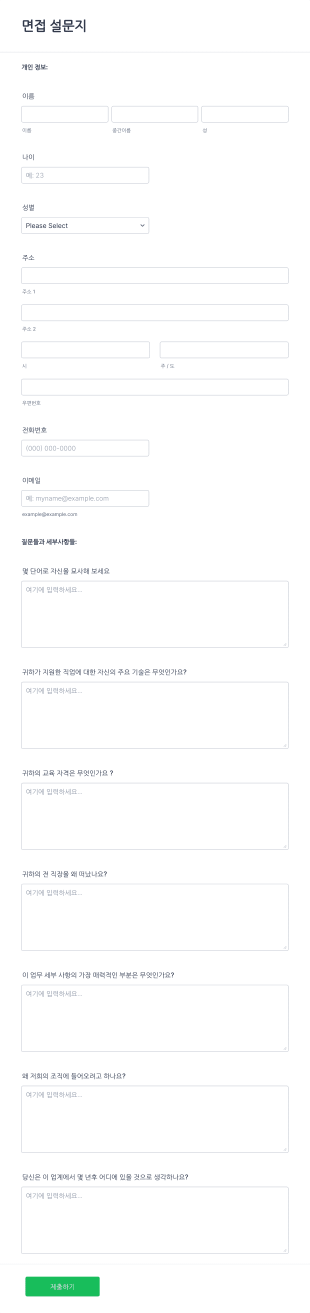
온라인 면접 설문지 양식
이 온라인 면접 설문지는 면접자의 개인 및 연락처 정보, 업무 경험, 기술 그리고 면접 질문 응답들을 수집할 수 있게 합니다. 귀하는 이 템플릿을 토대로 사용하고 다양한 맞춤 설정 위젯을 사용해서 자신만의 폼을 만들거나 로고 및 질문들을 추가하고 자신의 웹사이트에 이것을 임베드 하거나 독립적인 폼으로도 사용할 수 있습니다.
카테고리로 이동:설문지 템플릿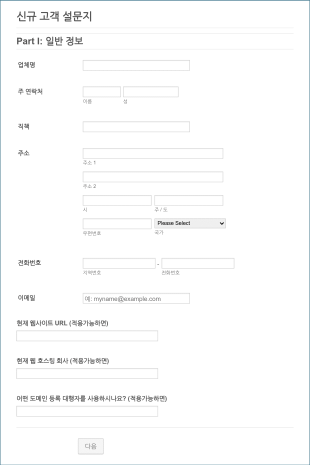
웹 디자이너 클라이언트 설문지
웹 디자이너 고객 설문지는 신규 고객들에게서 가입 정보를 수집하기 위해 웹 디자이너들에 의해 사용됩니다. 귀하는 웹 디자이너로서 이 무료 웹 디자이너 설문지로 귀하의 고객들을 위한 최고의 웹사이트를 만드는데 필요한 모든 정보를 간편하게 수집할 수 있습니다. 이 폼 템플릿은 귀하의 요구에 맞도록 간단하게 맞춤 설정될 수 있으며 웹사이트에 임베드 하거나 이메일을 통한 공유로 제출자료들이 귀하의 Jform 계정으로 바로 전송되게 할 수 있습니다. 또한 귀하는 모든 기기에서 제출된 정보에 접근할 수 있으며 이것은 이동 중에도 디자인 관련 업무를 할 수 있게 합니다. 귀하는 개인적인 감성을 더하고 싶으신 가요? 회사 로고를 추가하고 작업 사진들을 업로드하거나 글꼴과 색깔들을 변경하십시오. 정보를 더 잘 정리하고 팀과 협업하기 위해서 Slack, monday.com, Airtable, Salesforce 등과 같은 강력한 도구들로 130개 이상의 앱에 폼 제출자료들을 연동할 수 있습니다.
카테고리로 이동:설문지 템플릿
메트로놈 설정 설문
메트로놈 설정 양식으로 연주자와 레슨 강사가 연습 기준을 빠르게 정리하고 공유할 수 있도록 돕고, Jform에서 데이터 수집과 양식 응답 관리를 간편하게 진행하세요.
카테고리로 이동:설문조사 템플릿

가정 교육비 재정 기초 조사
가구 교육비 기초조사 설문 양식으로 교육비 지출과 부담 수준, 지원 수요를 파악해 지역과 대상별 현황 분석 및 예산 계획에 필요한 데이터 수집을 진행하세요.
카테고리로 이동:설문조사 템플릿
주간 창의 점검 설문
주간 창작 점검 설문 양식으로 창작자와 팀의 주간 진행 상황을 기록하고 다음 주 우선순위를 정리해 지속적인 작업 관리와 데이터 수집을 지원하세요.
카테고리로 이동:설문조사 템플릿
노래 주제 제출 설문
노래 주제 제출 양식은 의뢰곡이나 프로젝트용 아이디어를 장르와 분위기 중심으로 모아 데이터 수집을 돕고, 창작자와 제작팀이 양식 응답을 한곳에서 관리하도록 지원합니다.
카테고리로 이동:설문조사 템플릿
외국인 경력 지원 설문
해외 경력 지원 설문 양식은 해외 취업 상담과 커리어 코칭을 위해 지원자의 목표와 지원 필요 사항을 빠르게 데이터 수집하고 양식 응답을 체계적으로 관리하려는 기관에 적합합니다.
카테고리로 이동:설문조사 템플릿
의사결정 기준 설문
의사결정 기준 조사 설문지 양식은 개인과 조직의 의사결정 우선순위와 선택 기준을 데이터 수집으로 파악하려는 교육기관, 상담, 연구, 내부 평가에 적합한 설문용 양식 템플릿입니다.
카테고리로 이동:설문조사 템플릿
고용 준수 설문
고용 준수 질문지 양식은 채용 담당자가 지원자의 근무 가능 조건과 경력, 내부 규정 이해 여부를 온라인에서 데이터 수집하고 양식 응답을 체계적으로 정리하는 데 도움을 줍니다.
카테고리로 이동:설문지 템플릿
보안 위험성 평가 체크리스트
보안 위험 평가 설문지는 조직과 시스템의 보안 현황을 점검하고 위험 수준과 조치 계획을 정리하려는 정보보호 담당자와 운영팀을 위한 양식 템플릿입니다.
카테고리로 이동:설문조사 템플릿
조약 분석 설문
조약 분석 양식은 조약의 적용 범위와 당사자, 핵심 조항의 영향 평가를 한국어로 정리하려는 법무팀, 연구기관, 국제협력 조직에 유용한 양식 템플릿입니다.
카테고리로 이동:법률 양식
현장 방문 계획 체크리스트
현장 방문 계획 설문 양식으로 방문 일정과 준비 사항을 사전에 취합해 부서 간 조율을 돕고, Jform에서 데이터 수집과 양식 응답 관리를 한곳에서 진행하세요.
카테고리로 이동:설문조사 템플릿
조직 문화 진단 설문
사회적 분위기 진단 설문지 양식 템플릿으로 지역사회 신뢰, 소속감, 안전 인식 등 설문 데이터를 수집하고 공공기관, 학교, 연구 목적의 분석 자료로 활용해 보세요.
카테고리로 이동:설문조사 템플릿
거주 외국인 금융 경험 설문
재외 금융 경험 설문 양식으로 해외 거주자와 해외 근무자의 금융 이용 경험과 만족도, 개선 의견을 온라인으로 수집해 연구, 서비스 기획, 정책 검토에 활용하세요.
카테고리로 이동:설문조사 템플릿
프로모션 영상 제작 의뢰서
프로모션 영상 제작 브리핑 양식으로 제작 의뢰 내용을 표준화해 모으고, 마케팅 담당자와 제작사가 같은 기준으로 요청을 정리해 빠르게 협업할 수 있습니다.
카테고리로 이동:설문지 템플릿설문 템플릿 및 예제들 정보
설문지 템플릿은 응답자로부터 구조화된 정보를 수집하기 위해 사전에 설계된 양식입니다. 이 템플릿은 고객 만족도 조사, 직원 참여 평가, 학술 연구, 건강 검사, 시장 조사 등 다양한 목적과 산업에 맞게 조정할 수 있습니다. 일관된 데이터 수집 구조를 제공함으로써 설문지 템플릿은 데이터 수집, 분석, 실행 가능한 인사이트 도출 과정을 간소화합니다.
With Jform, users can easily access and customize a wide range of questionnaire templates to fit their specific needs. Leveraging Jform’s intuitive drag-and-drop Form Builder, users can add or modify questions, integrate widgets, and apply conditional logic without any coding knowledge. Jform’s platform also supports seamless data collection, automatic storage, and real-time notifications, making it an ideal solution for anyone looking to simplify the process of creating, distributing, and managing questionnaires for business, academic, or personal use.
Use Cases of Questionnaire Templates
Questionnaire templates are versatile tools that can be adapted to a wide array of scenarios. Their primary function is to facilitate efficient data collection, but the specifics of their use, the problems they solve, and the way they are structured can vary greatly depending on the context. Here’s how they can be utilized:
1. 활용 가능한 사례:
- Academic research (student or faculty surveys, course evaluations)
- Customer feedback (product satisfaction, service quality)
- Employee engagement and HR assessments
- Market research (consumer preferences, brand awareness)
- Health and wellness screenings
- Event planning (pre-event interest, post-event feedback)
- Nonprofit and community outreach (needs assessments, volunteer feedback)
2. 문제 해결 방법:
- Streamlines the process of gathering large volumes of data
- Ensures consistency in the questions asked, improving data reliability
- 수동 데이터 입력 및 오류를 줄입니다.
- Enables quick analysis and reporting
3. 예상 소유자 및 사용자:
- Business owners, HR professionals, and managers
- Researchers and academic staff
- Healthcare providers and wellness coaches
- Event organizers and nonprofit leaders
- Marketing and product development teams
4. 제작 방법별 차이점:
- Content and fields differ based on the objective: e.g., a health screening questionnaire may include medical history and symptom checklists, while a customer feedback form focuses on satisfaction ratings and open-ended comments.
- Some questionnaires require conditional logic to show or hide questions based on previous answers.
- The choice of question types (multiple choice, rating scales, open text) varies by use case.
In summary, questionnaire templates offer a flexible foundation for collecting targeted information, and their adaptability makes them suitable for virtually any data-gathering scenario.
How to Create a Questionnaire Template
Creating a questionnaire template with Jform is a straightforward process that empowers users to design effective, customized questionnaires for any purpose. Whether you’re conducting academic research, gathering customer feedback, or assessing employee engagement, Jform’s platform provides all the tools you need to build, distribute, and manage your questionnaire efficiently.
시작하려면 다음 단계를 따르세요:
1. Choose Your Starting Point:
- Log in to your Jform account and click “Create” on your My Workspace page.
- Select “Form” and decide whether to start from scratch or use one of Jform’s 10,000+ premade questionnaire templates.
- If you start from scratch, choose between the Classic Form (all questions on one page) or Card Form (one question per page) layout, depending on your audience and the complexity of your questionnaire.
2. Customize the Questionnaire Content:
- Click on the “Add Element” menu to access a variety of question types, including multiple choice, dropdowns, rating scales, short and long text, and more.
- Tailor your questions to your specific use case. For example:
- For customer feedback, include satisfaction ratings and open-ended comment fields.
- For academic research, use Likert scales and demographic questions.
- For health screenings, add checkboxes for symptoms and fields for medical history.
- Use conditional logic to display relevant questions based on previous answers, ensuring a personalized and efficient experience for respondents.
3. Design and Brand Your Questionnaire:
- Open the Form Designer by clicking the paint roller icon.
- 조직의 브랜딩에 맞게 색상, 글꼴, 레이아웃을 조정하세요.
- 로고를 추가하고 양식 URL을 맞춤화해 전문성을 높이세요.
4. 알림 및 데이터 관리 설정:
- 설정 메뉴에서 새 제출 시 이메일 알림을 받을 수 있도록 구성하세요.
- Set up autoresponder emails to thank respondents or provide follow-up information.
- All responses are automatically stored in Jform Tables, where you can filter, search, and export data for analysis.
5. Publish and Share Your Questionnaire:
- Click “Publish” to access sharing options.
- Copy the direct link, embed the questionnaire on your website, or share via email and social media.
- Adjust privacy settings to control who can access and submit responses.
6. Test and Monitor:
- Use the Preview function to test your questionnaire and ensure all logic and fields work as intended.
- Monitor submissions in real time and use Jform’s analytics tools to gain insights from your data.
- By following these steps, you can create a questionnaire template that is tailored to your specific needs, streamlines data collection, and provides actionable insights for your organization or project.
자주하는 질문들
1. What is a questionnaire template?
A questionnaire template is a pre-designed form used to collect structured information from respondents for various purposes, such as research, feedback, or assessments.
2. Why are questionnaire templates important?
시간을 절약하고 데이터 수집의 일관성을 보장하며, 그룹이나 기간별로 응답을 분석하고 비교하기 쉽게 만들어줍니다.
3. What information is typically included in a questionnaire template?
일반적으로 포함되는 필드는 객관식 질문, 평점 척도, 서술형 입력란, 인구 통계 질문, 조건부 논리를 포함한 경험 맞춤 항목 등입니다.
4. Are there different types of questionnaire templates?
네, 템플릿은 고객 만족도, 직원 참여도, 학술 조사, 건강 검사 등 특정 목적에 맞게 설계할 수 있습니다.
5. Who can use questionnaire templates?
기업, 교육자, 연구자, 의료기관, 행사 기획자, 비영리 단체 등 구조화된 데이터를 수집해야 하는 누구나 사용할 수 있습니다.
6. How do questionnaire templates help with data privacy?
Platforms like Jform offer secure data storage, encryption, and privacy controls to ensure respondent information is protected and compliant with regulations.
7. Can questionnaire templates be customized for branding?
Absolutely. You can add your logo, adjust colors and fonts, and personalize the form’s URL to reflect your organization’s identity.
8. What are the benefits of using online questionnaire templates over paper forms?
Online templates streamline data collection, reduce manual entry errors, enable real-time analysis, and make it easier to distribute and manage responses.