

서비스 양식
It 서비스 티켓 폼
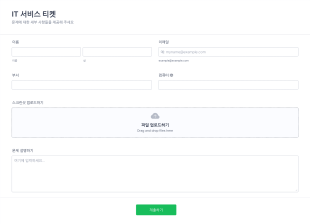
이 표준 IT 서비스 폼은 다른 부서와 기기에서 네트워크 문제들을 해결하는 것과 같은 일상의 IT 관련 업무들을 다루는 비지니스에 매우 유용합니다. 귀하는 각 시스템에서 발생하는 문제들에 대한 파일 첨부를 허락하는 IT 서비스 티켓 템플릿으로 이것을 사용할 수 있습니다. 귀하는 의사소통을 위한 주요 수단으로 이것을 사용할 수 있습니다.
카테고리로 이동:서비스 양식서비스 양식 정보
서비스 양식은 다양한 서비스를 제공하는 기업이 데이터를 효율적으로 수집, 관리, 분석할 수 있도록 설계된 디지털 양식입니다. 고객 문의, 서비스 요청, 피드백, 예약 등을 효율적으로 처리하여 운영 업무를 간소화할 수 있습니다. 컨설팅 회사, 수리 서비스 업체, 고객 지원팀 등 서비스 중심의 다양한 비즈니스에서 상세한 고객 정보를 수집하고 서비스 일정을 관리하며 피드백을 받는 데 활용됩니다. 이를 통해 원활한 업무 흐름을 유지하고 전반적인 서비스 품질을 높일 수 있습니다.
Jform stands out as the leading online form builder in the realm of Services Forms, providing a seamless user experience with its intuitive drag-and-drop interface. The platform allows for extensive customization, enabling businesses to tailor forms to specific needs and automate data collection processes, thereby minimizing manual errors and saving time. Furthermore, Jform Tables offer centralized data management, facilitating easy access and organization of collected data, which helps businesses maintain an efficient workflow and make data-driven decisions.
Why Use Services Forms?
- Services Forms ensure high accuracy in data collection by minimizing manual entry errors, which is crucial for maintaining reliable records and enhancing decision-making processes. With structured fields, these forms guide respondents to provide precise information, reducing discrepancies in collected data.
- Speed is a significant advantage when using Services Forms. They allow for rapid data gathering and processing, which is essential for businesses that need to respond quickly to customer requests or changes in service requirements. This efficiency helps maintain customer satisfaction and operational fluidity.
- Professional data handling is a hallmark of Services Forms, as they streamline the data management process. By automating data entry and integrating with existing systems, these forms reduce the burden of manual data handling and enhance data accuracy and accessibility.
- Services Forms improve workflow automation by incorporating features such as conditional logic, which automatically routes information and triggers specific actions based on responses. This automation reduces the need for manual intervention and speeds up service delivery.
- The integration of advanced features like electronic signatures and payment gateways allows businesses to complete transactions and agreements directly within the form, making the process seamless and efficient for both service providers and clients.
Common Problems Solved by Services Forms
- One of the primary issues businesses face is the cumbersome nature of paperwork, which Services Forms effectively mitigate by digitizing the entire process. This transition not only saves physical storage space but also accelerates the retrieval and organization of information.
- Manual data entry is prone to errors and can be time-consuming. Services Forms eliminate this problem by automating data capture and reducing the need for repetitive manual input, ensuring that the data collected is accurate and promptly processed.
- Lost or misplaced data is a common concern with traditional methods, but digital forms ensure that all submissions are securely stored and easily retrievable. This secure data management enhances reliability and allows for data backup and recovery in case of unforeseen events.
- Delays in service delivery due to inefficient data handling can hurt customer satisfaction. Services Forms streamline communication and data processing, enabling faster response times and improving the overall customer experience.
Matching Use Cases to Features
- For businesses that require precise data customization, the Drag-and-Drop Form Builder allows users to easily design forms tailored to specific service offerings. This feature enhances operational efficiency by creating forms that align perfectly with business needs.
- Conditional Logic is essential for companies that need dynamic forms that adapt to user input, enabling services to be customized in real-time based on customer responses. This feature helps in creating an intuitive and responsive interaction for users.
- Businesses that need to collect payments directly through their forms benefit from Jform’s integration with over 30 payment gateways like Stripe and PayPal. This capability streamlines the payment process, offering convenience for both the service provider and the client.
- Jform's Electronic Signatures feature is crucial for businesses needing to finalize agreements within the form itself. This feature expedites the contract process and enhances the professionalism and security of service transactions.
- For organizations that require comprehensive data analysis, the integration with 100+ third-party applications like Google Sheets and Salesforce enables seamless data transfer and management. This integration supports sophisticated data analysis and reporting.
How to Create a Services Form
- Start by browsing the Template List for a Servicess template or initiate your design from a blank form, depending on the specific needs of your business.
- Customize the design and fields using Jform's Drag-and-Drop Form Builder, which allows you to tailor the form's appearance and functionality to your service requirements.
- Publish and share your form through various channels such as Direct Link, Email, or Website Embed to reach your intended audience efficiently and effectively.
Top Use Cases for Services Forms
- For Managers: Services Forms provide managers with a streamlined method to oversee and manage service requests, appointments, and client interactions. The centralized data management system allows managers to track service performance, analyze client feedback, and make informed decisions to improve service delivery. By automating workflows, managers can focus on strategic planning rather than being bogged down by administrative tasks, resulting in enhanced operational efficiency and service quality.
- For Teams: Services Forms facilitate seamless collaboration among team members by providing a unified platform for capturing and sharing information. With features like conditional logic and approval workflows, teams can coordinate more effectively, ensuring that tasks are assigned and completed in a timely manner. The use of digital forms reduces miscommunication and enhances the accuracy of shared data, which is critical for maintaining high standards of service provision.
- For Customers: For customers, Services Forms offer a convenient and user-friendly way to interact with service providers. By enabling customers to submit requests, provide feedback, and make payments directly through the form, businesses can enhance the customer experience and satisfaction. The ease of use and accessibility of these forms ensure that customers can engage with services at their convenience, leading to increased loyalty and repeat business.
Summarizing Services Forms
Services Forms present a comprehensive solution for businesses aiming to optimize their service delivery processes. By leveraging Jform’s robust online form builder, companies can create highly customized, efficient, and secure forms that enhance data collection and management. These forms not only streamline operational workflows but also improve customer interaction and satisfaction, ultimately contributing to business growth and success.
자주하는 질문들
1. 서비스 양식 템플릿이란 무엇인가요?
서비스 양식 템플릿은 비즈니스 및 전문가가 고객으로부터 서비스 예약, 요청, 피드백 또는 결제와 관련된 정보를 수집하는 데 사용하는 미리 디자인된 온라인 양식입니다.
2. Why are services forms important for businesses?
Services forms help automate and organize client interactions, reduce manual paperwork, and ensure accurate data collection, leading to improved efficiency and customer satisfaction.
3. What information should be included in a services form?
Typical fields include client contact details, service type, preferred date and time, specific requirements or descriptions, and payment information if applicable.
4. Are there different types of services forms?
Yes, services forms can vary widely, including appointment booking forms, service request forms, feedback forms, quotation forms, and onboarding forms, each tailored to specific business needs.
5. Who can use services form templates?
Any service-based business or professional—such as consultants, repair technicians, healthcare providers, and event planners—can use these templates to streamline their operations.
6. 서비스 양식은 고객과의 소통에 어떻게 도움이 되나요?
They provide a structured way to collect and respond to client requests, automate confirmations and reminders, and ensure all necessary information is gathered upfront.
7. 서비스 양식을 통해 제출된 정보는 안전한가요?
Yes, Jform uses secure data encryption and offers compliance with privacy standards to protect client information submitted through its forms.
8. 서비스 양식을 다른 비즈니스 도구와 통합할 수 있나요?
물론입니다. Jform은 CRM 시스템, 결제 게이트웨이, 이메일 마케팅 플랫폼 등과 통합할 수 있어 원활한 워크플로우 자동화와 데이터 관리가 가능합니다.