

웹 디자인 양식
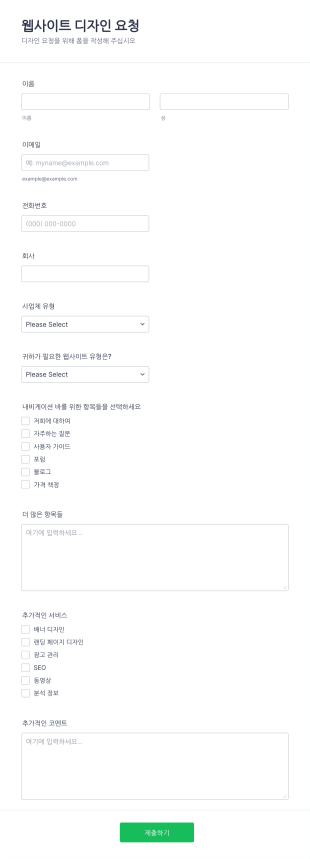
웹사이트 디자인 요청 양식
웹사이트 디자인 요청 폼으로 귀하는 고객들의 사업 유형과 웹사이트에 대한 기대치를 이해할 수 있는 정보를 받을 수 있습니다. 이 폼은 디자인을 세부적으로 이해할 수 있게 하며 SEO, 광고 관리, 분석 등과 같은 추가적인 정보를 제공합니다. 많은 맞춤 설정 도구와 위젯으로 이 폼을 사용해서 귀하만의 폼을 구축하십시오.
카테고리로 이동:웹 디자인 양식
웹사이트 제출 폼
이 웹사이트 제출 폼으로 웹사이트의 제출내용들을 쉽게 받아보세요. 링크, 사용자 데이터 및 키워드들을 편리하게 수집하십시오. 웹사이트 제출 폼으로 귀하는 웹사이트 방문 수를 늘리고 귀하가 제공하는 것에 관심있는 사람들에게 자신과 비지니스에 대해 더 홍보할 수 있는 기회입니다. 무료 웹사이트 제출 폼을 통해 웹사이트 방문객들에 대한 연락처 세부사항들을 모으세요. 귀하는 심지어 자신의 로고를 추가하거나 배경 이미지를 바꾸기 위해 폼 빌더를 사용할 수 있으며 방문자들의 관심과 정보를 모으기 위해 더 많은 필드들을 수집할 수 있습니다. 수십개의 멋진 폼 테마들 중에서 선택하거나 자신만의 배경 이미지를 업로드 하세요 - 저희는 25개 이상의 무료 배경 이미지들을 제공합니다. 만약 귀하가 스토리지 서비스에서 응답들을 수집하길 원하거나 이메일을 통해 피드백을 받고 Google 시트에서 폼 제출사항들을 추적하길 원한다면 Jform은 100개 이상의 선택할 수 있는 연동 기능들이 있으며 그것들은 더 늘어나고 있습니다. 고객들로 하여금 귀하가 필요한 정보를 쉽게 보낼 수 있도록 하십시오 - Jform의 사용하기 쉬운 폼 빌더로 원하는 모양을 만들어 보십시오. 오늘 무료 웹사이트 제출 폼을 만들어 보세요.
카테고리로 이동:웹 디자인 양식웹 디자인 양식 정보
Web Design Forms are specialized digital forms tailored for the intricate needs of web design projects. These forms facilitate a seamless flow of information between clients and designers, ensuring that all project requirements are captured accurately and efficiently. Whether it's gathering initial project specifications or managing ongoing feedback during the design process, Web Design Forms play a critical role in streamlining communication and documentation. By utilizing these forms, web designers and agencies can ensure that every detail is accounted for, thus enhancing project outcomes and client satisfaction.
Jform stands out as the premier online form builder for creating and managing Web Design Forms, offering unparalleled ease of customization and robust functionality. Its intuitive drag-and-drop interface allows users to tailor forms to specific project requirements effortlessly, while automated data collection features streamline the process of gathering and storing information. Moreover, centralized data management through Jform Tables provides a secure and organized platform for storing and accessing form data, ensuring that all project-related information is easily retrievable and manageable. This makes Jform an indispensable asset for web design professionals seeking to optimize their workflow and enhance client interactions.
Why Use Web Design Forms?
- Web Design Forms ensure that critical project details are captured with precision, reducing the risk of misunderstandings and errors. By using structured online forms, designers can systematically gather client requirements, preferences, and feedback, leading to more accurate project execution.
- The speed of information collection and processing is greatly enhanced with Web Design Forms. Instead of relying on back-and-forth emails or phone calls, clients can quickly fill out forms at their convenience, providing designers with timely and relevant data to move the project forward efficiently.
- Professional data handling is a cornerstone of Web Design Forms, as the digital format minimizes the risk of lost or misplaced information. With centralized digital storage, all form submissions are automatically organized, making it easy to track and reference project details at any stage.
- Customization capabilities allow designers to tailor forms to the specific needs of each project, ensuring that all unique requirements are addressed. This adaptability helps in accommodating diverse project scopes, from simple website updates to complex redesigns, without losing consistency or quality.
- Automation features in Jform's Web Design Forms reduce manual administrative tasks, freeing up more time for designers to focus on creative work. This leads to increased productivity and a more streamlined workflow, ultimately benefiting both the design team and the client.
Common Problems Solved by Web Design Forms
- Many web design projects suffer from communication breakdowns due to incomplete or unclear information. Web Design Forms help mitigate this issue by providing a structured format for clients to convey their needs clearly and comprehensively, reducing the likelihood of miscommunication.
- Paperwork and manual data entry can be time-consuming and prone to errors. By switching to digital forms, web design teams can eliminate the inefficiencies associated with traditional paperwork, ensuring that all data is captured accurately and stored electronically for easy access.
- Lost or misplaced project details can derail timelines and affect project outcomes. With Web Design Forms, all data is securely stored online, reducing the risk of information loss and enabling designers to maintain continuity throughout the project lifecycle.
- Managing multiple client projects simultaneously can lead to organizational challenges. Web Design Forms provide a centralized platform for tracking submissions and organizing data, making it easier for designers to juggle multiple projects without losing track of individual project requirements.
- The manual approval process can delay project progress. With Jform's Approval Workflows feature, Web Design Forms can streamline the approval process, allowing for faster decision-making and project advancement.
Matching Use Cases to Features
- For capturing detailed project specifications, the Drag-and-Drop Form Builder allows designers to create forms that include all necessary fields, ensuring comprehensive data collection in a user-friendly manner.
- Conditional Logic can be used to tailor the form experience for clients, showing or hiding fields based on previous responses. This feature ensures that clients only fill out relevant sections, making the form submission process more efficient and personalized.
- To facilitate payments for design services, Web Design Forms can integrate with over 30 Payment Gateways, including Stripe and PayPal. This allows clients to make secure payments directly through the form, streamlining the billing process.
- Electronic Signatures (Jform Sign) enable designers to obtain client approvals on proposals or design drafts directly within the form, ensuring that all authorizations are documented and legally binding.
- The PDF Editor feature allows for the automated generation of professional PDF documents from form submissions, providing a polished and easily shareable record of all client interactions and project agreements.
- Integration with third-party services like Google Sheets and Salesforce enables seamless data transfer and management, allowing design teams to maintain updated and synchronized project records.
- Secure Data Management with Jform Tables ensures that all collected data is stored securely, protecting client information and maintaining compliance with data protection regulations.
How to Create a Web Design Form
- Begin by browsing the Template List for a Web Designs template that suits your needs or start from a blank form to build a custom solution.
- Use the Drag-and-Drop Form Builder to customize the design and fields, ensuring that all specific project requirements are addressed and the form is intuitive for clients to complete.
- Once your form is finalized, publish and share it via Direct Link, Email, or Website Embed to ensure easy access for clients and stakeholders.
Top Use Cases for Web Design Forms
- For Managers: Web Design Forms provide managers with a comprehensive tool to oversee all ongoing projects, ensuring that each project is on track and that all client requirements are being addressed. The ability to access real-time data and analytics enables managers to make informed decisions quickly, optimizing resource allocation and improving overall project management efficiency.
- For Teams: Design teams benefit from Web Design Forms by having a centralized platform to collaborate and communicate effectively. With all project details and client inputs readily available, team members can coordinate their efforts, ensuring consistency and alignment with project goals. This collaborative approach leads to higher quality outcomes and a more cohesive team dynamic.
- For Customers: Clients using Web Design Forms experience a seamless and professional interaction with their design partners. The structured format of the forms ensures that clients can convey their needs clearly and efficiently, while the automated processes reduce waiting times and enhance overall satisfaction. This level of service fosters trust and strengthens client relationships.
Summarizing Web Design Forms
Web Design Forms are an essential component for any web design project, offering a structured and efficient way to manage client interactions and project requirements. By leveraging Jform’s advanced features, designers can streamline their workflows, reduce errors, and enhance communication, ultimately delivering superior results. The ability to customize forms to specific project needs, coupled with secure data management, makes Jform an invaluable partner in the web design industry.
자주하는 질문들
1. 웹 디자인 양식이란 무엇인가요?
네, Jform은 웹 디자인 양식을 만들고 맞춤 설정할 수 있는 무료 요금제를 제공합니다. 다만 생성할 수 있는 양식 수와 제출자료 수에는 제한이 있습니다.
2. IT 양식은 조직에 왜 중요한가요?
Absolutely, Jform prioritizes data security with measures such as SSL encryption, compliance with GDPR, and secure data storage practices to protect client information.
3) Do I need coding knowledge to build a Web Design Form?
No, Jform’s Drag-and-Drop Form Builder is designed for ease of use, allowing users to create fully functional forms without any coding expertise.
4. IT 양식에는 다양한 유형이 있나요?
Yes, Web Design Forms can integrate with over 30 payment gateways, enabling secure and convenient payment collection directly through the forms.
5. 누가 IT 양식을 사용해야 하나요?
Indeed, Jform’s forms are mobile-responsive, ensuring that clients can complete and submit forms from any device, enhancing accessibility and convenience.
6. IT 양식은 워크플로우 효율성을 어떻게 향상시키나요?
Yes, with Jform’s PDF Editor, you can automatically generate polished PDF documents from form submissions, perfect for record-keeping or sharing with clients.
7. 웹 디자인 양식을 통해 제출된 정보는 안전한가요?
Using structured forms ensures all client feedback and requirements are clearly documented, reducing miscommunication and improving project outcomes.
8. 웹 디자인 양식을 다양한 유형의 프로젝트에 맞게 사용자 지정할 수 있나요?
네, Jform은 Asana와 Trello 같은 프로젝트 관리 도구를 포함한 다양한 외부 서비스와 연동할 수 있어 작업 흐름을 간소화하고 데이터를 원활하게 동기화할 수 있습니다.