

무료 인적자원(HR) 양식 템플릿들

근무 가능 일정 설문
근무 가능 시간 확인서 양식으로 직원의 근무 가능 일정 정보를 온라인으로 수집하고, 팀별 스케줄 편성과 인력 배치 결정을 빠르게 지원하세요.
카테고리로 이동:인적자원 양식
리더십 팀 명단 설문
리더십 팀 명부 양식은 조직의 리더 연락처와 역할 정보를 온라인으로 데이터 수집하고 최신 명부로 관리하려는 기업과 기관에 적합한 양식 템플릿입니다.
카테고리로 이동:인적자원 양식
면담 일정 신청서
면접 일정 조율 양식은 기업 인사팀과 채용 담당자가 지원자와 면접 일정과 진행 방식을 빠르게 조율하고, 양식 응답을 모아 데이터 수집과 후속 안내를 체계적으로 진행하도록 돕습니다.
카테고리로 이동:인터뷰 양식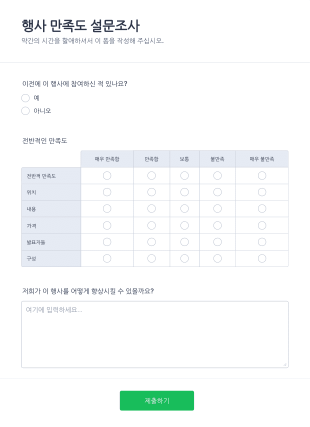
행사 만족도 설문조사 양식
만약 귀하의 다음 행사를 개선하고 샆다면 이 행사 만족도 설문조사 템플릿을 통해 참가자들의 제안을 볼 수 있습니다. 이 샘플 피드백 폼은 행사 서비스들을 분류하는 것으로 전반적인 만족도를 파악할 수 있게 합니다. 이 분류 사항들은 위치, 내용, 가격, 발표자들 및 구성 등을 포함합니다.
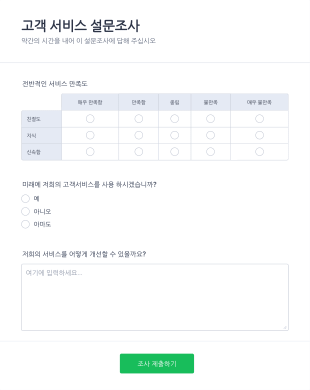
고객 만족도 설문조사 양식
고객 만족도 설문조사는 사업체의 고객들을 알아가는데 사용됩니다. 귀하의 업체를 위한 고객 피드백을 수집하는 온라인 고객 만족도 설문조사로 귀하는 무엇을 잘하고 있고 고객들을 더 잘 관리하기 위해 필요한 것이 무엇인지를 파악할 수 있습니다. 귀하의 요구에 맞게 템플릿을 맞춤 설정할 수 있으며, 웹사이트 폼을 임베드 하거나 링크로 고객들과 직접 공유하며 Jform 계정에서 반응들이 나타나는 것을 기다릴 수 있습니다. 귀하는 모든 기기에서 반응들을 열람하거나 관리할 수 있으며 팀이 저희의 무료 Jform 모바일 폼 앱으로 이동중에도 실시간으로 제출자료들을 검토하게 할 수 있습니다.
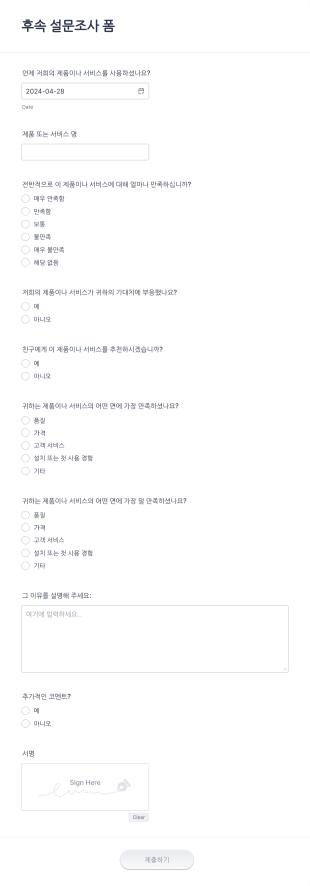
후속 설문조사 양식
이 설문조사 폼으로 귀하의 고객들로부터 정보를 수집하십시오. 이것은 고객들이 귀하의 제품이나 서비스에 대한 경험을 제공하고 기대치를 평가하게 합니다. 만약 귀하가 처음부터 새것을 만들고 싶다면 지금 맞춤 설정 온라인 설문조사로 시작하실 수 있습니다.

직원 만족도 설문
무료 온라인 설문조사를 통해 직원들을 알아보세요. 어떤 기기에서든 응답을 수집하세요. 코딩 없이 몇 분 만에 맞춤 설정을 완료할 수 있습니다. 100개 이상의 인기 앱에 응답을 동기화할 수 있습니다.
무료 인적자원(HR) 양식 템플릿들 정보
인사팀 양식은 조직 내 다양한 인사 절차를 간소화하도록 설계된 전문 디지털 양식입니다. 직원 온보딩과 성과 평가부터 휴가 요청과 퇴사 면담까지 폭넓은 인사 업무를 지원합니다. 빠르게 변화하는 인사 업무 환경에서 데이터를 효율적이고 정확하게 수집하여 인사팀의 부담을 줄이고 전반적인 운영 업무 흐름을 개선하는 데 도움이 됩니다. 직원 정보를 관리하거나 교육 세션을 추적하는 등 회사 인사 부서의 원활한 소통과 문서 관리를 유지하는 데 중요한 역할을 합니다.
Jform serves as the premier online form builder for creating and managing Human Resources (HR) Forms. With its user-friendly interface, Jform allows HR professionals to customize forms effortlessly, tailoring them to meet specific organizational needs. The platform's ability to automate data collection processes ensures that information is captured consistently and accurately, reducing the risk of errors. Moreover, Jform Tables offer centralized data management, enabling HR teams to organize, analyze, and access data from a single, secure location. This comprehensive solution empowers HR departments to enhance their efficiency and focus more on strategic HR initiatives.
Why Use Human Resources (HR) Forms?
- Human Resources (HR) Forms significantly boost data accuracy by eliminating the need for manual data entry, which is prone to human errors. By having employees fill out digital forms, organizations ensure that the captured data is precise and reliable, leading to better decision-making processes.
- The speed of data collection is greatly enhanced with HR forms. As opposed to traditional paper forms, digital HR forms enable instant submission and processing of information, allowing HR teams to act swiftly on the data received, whether it be for onboarding new employees or processing leave requests.
- Professional data handling is a hallmark of HR forms, offering a structured approach to managing sensitive employee information. By adhering to industry standards for data protection and confidentiality, HR forms ensure that all collected data is handled with the utmost care and security.
- HR forms facilitate seamless communication between employees and HR departments. By providing a centralized platform for submitting inquiries, feedback, and requests, these forms help streamline communication channels, ensuring that all parties are on the same page.
- Automation of routine HR tasks is made possible with digital forms. By integrating HR forms with existing systems and workflows, organizations can automate repetitive tasks such as sending email confirmations or updating employee records, thereby freeing up valuable time for HR professionals.
Common Problems Solved by Human Resources (HR) Forms
- One of the primary issues HR departments face is the overwhelming amount of paperwork, which can lead to inefficiencies and lost documents. HR forms digitize this paperwork, making it easier to manage and reducing the risk of misplaced documents.
- Manual entry of employee data is not only time-consuming but also increases the likelihood of errors. HR forms automate this process, ensuring that information is accurately captured and reducing the need for redundant data entry.
- Lost data can have significant implications for an organization, especially when it comes to compliance and employee management. HR forms provide a secure and reliable way to store and manage data, ensuring that all information is preserved and easily retrievable when needed.
- Keeping track of employee requests and approvals can be challenging without a standardized process. HR forms streamline these workflows by providing a structured format for submissions and approvals, ensuring that nothing falls through the cracks.
Matching Use Cases to Features
- The Drag-and-Drop Form Builder is ideal for customizing HR forms to suit specific departmental needs. HR professionals can easily add, remove, or modify fields to tailor forms for various purposes, such as performance reviews or employee feedback, ensuring that all necessary information is gathered efficiently.
- Conditional Logic in HR forms allows for dynamic form interactions, making the user experience more intuitive. For instance, forms can be set to display specific questions based on previous answers, streamlining the data collection process and ensuring only relevant information is requested from employees.
- With over 30 Payment Gateways, HR forms can facilitate transactions such as employee reimbursements or event registrations. By incorporating these gateways, organizations can handle financial transactions directly within the form, providing convenience and efficiency.
- Electronic Signatures (Jform Sign) enable HR departments to collect legally binding signatures directly on forms. This feature is particularly useful for contracts and agreements, ensuring that all documentation is completed and signed in a timely manner.
- The PDF Editor allows for automated PDF generation, creating professional documents from form submissions. This is particularly useful for generating employee records, contracts, or reports, ensuring that all documentation is consistent and easily shareable.
- Jform's 100+ Third-party Integrations, such as with Google Sheets or Salesforce, enhance workflow efficiency by ensuring that data collected through HR forms is seamlessly integrated into existing systems. This connectivity allows for real-time data updates and streamlined operations.
- Approval Workflows facilitate the routing of forms for necessary approvals, ensuring that requests such as leave applications or expense claims are properly vetted and authorized in a timely manner.
How to Create a Human Resources (HR) Form
- Browse the Template List for a Human Resources (HR)s template or start from a blank form. This step allows you to select a starting point that best fits your organization's requirements.
- Customize the design and fields using the Drag-and-Drop Form Builder. This intuitive process allows you to add or modify fields to create a form that meets your specific data collection needs.
- Publish and share via Direct Link, Email, or Website Embed. This ensures that your form is easily accessible to all intended participants, facilitating smooth data collection.
Top Use Cases for Human Resources (HR) Forms
- For Managers: Managers can leverage HR forms to streamline employee evaluations, goal setting, and feedback collection. By utilizing digital forms, managers can ensure that evaluations are conducted consistently and that feedback is gathered in a structured manner. This not only enhances the performance review process but also aids in identifying areas for employee development and growth.
- For Teams: Teams benefit from HR forms through streamlined communication and collaboration. Forms such as team feedback surveys or inter-departmental requests facilitate efficient information exchange and ensure that all team members are aligned with organizational objectives. This collaborative approach fosters a cohesive work environment and promotes team synergy.
- For Customers: While primarily designed for internal use, HR forms can also enhance customer interactions by ensuring that HR-related inquiries and processes are handled smoothly and professionally. For example, forms can be used to manage client training sessions or to gather feedback on HR service delivery, ensuring that client expectations are met and exceeded.
Summarizing Human Resources (HR) Forms
Human Resources (HR) Forms serve as a vital component in modern HR management, offering a comprehensive solution for streamlining data collection, enhancing communication, and automating routine tasks. By adopting digital forms, organizations can significantly reduce the administrative burden on HR teams, allowing them to focus on strategic initiatives that drive business success. With Jform's powerful features and integrations, HR departments are equipped with the tools needed to efficiently manage their workflows, ensuring that employee data is handled with precision and security.
자주하는 질문들
1) Is it free to create Human Resources (HR) Forms on Jform?
예. Jform은 기본 기능으로 인사팀 양식을 제작하고 사용할 수 있는 무료 요금제를 제공합니다. 다만 고급 기능이나 더 많은 제출 한도가 필요한 경우 유료 요금제로 업그레이드할 수 있습니다.
2. IT 양식은 조직에 왜 중요한가요?
예. Jform은 데이터 보안을 중요하게 여기며 SSL 암호화와 같은 업계 표준 보안 조치를 적용하여 모든 양식과 제출 데이터를 무단 접근으로부터 보호합니다.
3) Do I need coding knowledge to build a Human Resources (HR) Form?
아니요. Jform에서 인사팀 양식을 제작하는 데 코딩 기술은 필요하지 않습니다. 직관적인 드래그 앤 드롭 양식 빌더를 통해 양식을 손쉽게 제작하고 맞춤 설정할 수 있습니다.
4. IT 양식에는 다양한 유형이 있나요?
예. Jform은 30개 이상의 결제 게이트웨이를 지원하므로 직원 비용 환급이나 행사 등록 등 다양한 목적으로 양식을 통해 직접 결제를 받을 수 있습니다.
5. 누가 IT 양식을 사용해야 하나요?
예. Jform 양식은 반응형으로 제작되어 모든 모바일 기기에서 접속하고 작성할 수 있습니다. 이동 중인 직원과 인사팀도 편리하게 이용할 수 있습니다.
6. IT 양식은 워크플로우 효율성을 어떻게 향상시키나요?
예. Jform의 PDF 편집기를 사용하면 양식 제출 내용을 바탕으로 전문적인 PDF 문서를 자동 생성할 수 있어 기록을 간편하게 공유하고 보관할 수 있습니다.
7) How do HR forms streamline the onboarding process?
HR forms simplify the onboarding process by automating the collection of necessary information and documentation from new hires. This ensures a smooth transition and reduces the administrative workload on HR teams.
8) Can HR forms integrate with our existing HR systems?
Yes, Jform offers over 100 third-party integrations, allowing HR forms to seamlessly connect with existing HR systems and applications such as Google Sheets, Salesforce, and Slack, enhancing workflow efficiency.