앱
지금 시작하세요 — 무료입니다!
  • 제품
    • 스토어 빌더
    • 기부 앱
    • 인트라넷 앱 빌더
    • 교육용 앱 빌더
    • 레스토랑 앱 빌더
  • 기능
  • 템플릿
  • 요소
  • 요금제
    • Top Features
    • 스토리
    • 노코드에 대한 소개
    • 자주하는 질문
    • 동영상
    • Jform 아카데미
    • 도움말 가이드
    • 블로그 게시물
    • 앱 비용 계산기
  • 지금 시작하세요 — 무료입니다!

Create Actions

Make your app more dynamic with powerful Actions. Open forms, navigate users to a page, send emails, make calls, or link to external sites, all while keeping the experience smooth and well-organized.

대화 시작
Jform 앱
Create Actions 분류
Display Dynamic Lists
앱 만들기

Display Dynamic Lists

대화 종료
Jform LogoJform Icon
Jform 앱
Create Actions 분류
Display Dynamic Lists
더 알아보기: Display Dynamic Lists

Display Dynamic Lists

Showcase unlimited items with custom pages and interactive actions that boost engagement. Use flexible layouts and creative design options to craft unique experiences.

Add Buttons
더 알아보기: Add Buttons

Add Buttons

Add customizable buttons that link, call, email, or navigate with a simple drag-and-drop using the free Button element.

Open Form
더 알아보기: Open Form

양식 열기

Present your forms in a clean, polished way with Open Form. By connecting forms to elements, guide users to the right form without disrupting your app’s visual consistency.

Create Engaging Cards
더 알아보기: Create Engaging Cards

Create Engaging Cards

Showcase products or services with sleek cards featuring images, details, and instant actions like calls, emails, or links.

Open URL
더 알아보기: Open URL

Open URL

Guide users to the right place with a single tap. Open links from lists, cards, buttons, or images to easily connect your app to helpful pages and resources.

Direct Users to Specific Pages
더 알아보기: Direct Users to Specific Pages

Direct Users to Specific Pages

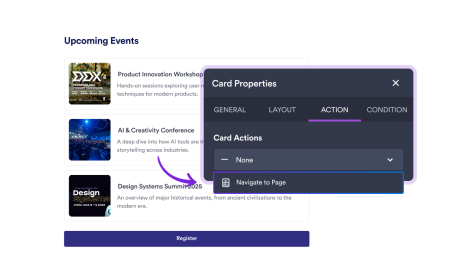
Navigate to Page lets you guide users through your app by linking Image, Card, and Button elements to specific pages.

Open Edit Screen
더 알아보기: Open Edit Screen

Open Edit Screen

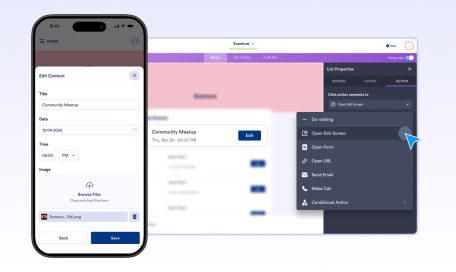
Easily edit your own form submissions directly within the app. Open Edit Screen lets users update their submitted data quickly and securely, keeping everything organized in one place.

Make Call
더 알아보기: Make Call

전화 걸기

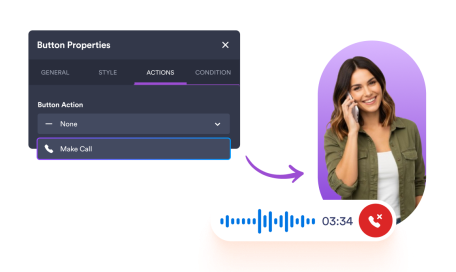
Enable instant communication with a single tap. Let users place phone calls directly from List, Card, Button, or Image elements by simply selecting the action and entering a phone number.

Control Access
더 알아보기: Control Access

Control Access

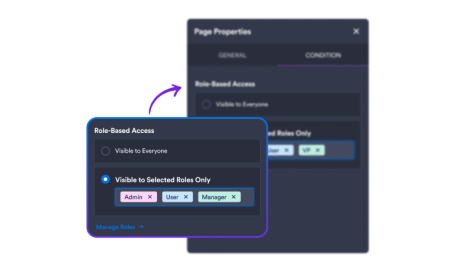
Control who sees what in your app with visibility rules for pages and content. Protect sensitive information while keeping your workspace organized and efficient.

Send Email
더 알아보기: Send Email

이메일 전송

Stay connected with users by adding email actions to Button, Card, Image, or List elements. Create a direct communication channel and keep conversations flowing.

Display Images
더 알아보기: Display Images

Display Images

Add vibrant visuals to your app with the Image element. Upload, reuse, or link photos while including alt text to boost accessibility.

분류
  • 소개12
  • 기능만들기 시작4
  • 기능Discover App Elements24
  • 기능Collect & Display Data9
  • 기능Design Your App5
  • 기능Configure App Settings6
  • 기능Set App Navigation4
  • 기능Create Actions11
  • 기능앱 공유5
  • 기능Use AI Features4
  • 기능보안4
  • 기능엔터프라이즈3
  • 기능데이터 관리2

Jform

  • 양식 만들기
  • 나의 작업 공간
  • 요금제
  • Jform 엔터프라이즈
      • 신청 양식
      • 등록 양식
      • 문의 양식
      • 피드백 양식
      • 주문 양식
      • 평가 양식
      • 예약 양식
      • 예약 양식
      • 요청 양식
      • 정부
      • 의료
      • 여름 캠프
      • 식당 및 식료품
      • 교회
      • 동물 보호소
      • 사진 촬영
      • 교육 전문가
      • 중소기업
      • 비영리 단체
      • 창의적 기업
      • 사용자 후기
      • 설문조사 만드는 방법
      • 정보수집 방식
      • 양식 디자인
      • 온라인에서 결제 받기
      • 코딩 없이 앱 만들기
      • QR 코드란 무엇인가요?
      • 웹사이트 만드는 방법
      • 온라인으로 판매하는 방법
      • 업무 평가 가이드
      • 재택근무
      • 모든 비지니스 가이드
    • 사용 사례
    • Jform 양식 빌더
    • Jform 일정 예약
    • Jform 앱
    • Jform AI 에이전트
    • Jform 보드
    • Jform 스토어 빌더
    • Jform 테이블
    • Jform 인박스
    • Jform 모바일 양식
    • Jform 워크플로우
    • Jform 리포트 빌더
    • Jform 스마트 PDF 양식
    • Jform PDF 편집기
    • Jform 서명
    • Jform AI NEW
    • ChatGPT 양식 빌더
    • Jform 팀
    • 조건부 논리
    • 대화 페이지
    • 양식 지정
    • 양식 번역
    • 화이트 라벨링
    • 양식 활성-비활성화
    • 여러 사용자
    • Embeddable Form Builder
  • 도구
  • AI 도구
    • Google Forms 대안
    • Microsoft Forms 대안
    • Typeform 대안
    • Tally Forms Alternative
    • Fillout 대안
    • Formstack 대안
    • SurveyMonkey 대안
    • Wufoo 대안
    • 123FormBuilder 대안
    • WPForms 대안
    • Paperform 대안
    • Adobe 서명 대안
    • PandaDoc 대안
    • DocuSign 대안
    • Jform 대안

구매

    • 양식 템플릿
    • 에이전트 템플릿
    • 보드 템플릿
    • 앱 템플릿
    • 워크플로우 템플릿
    • 테이블 템플릿
    • PDF 템플릿
    • 서명 템플릿
  • 양식 테마
  • 양식 위젯
    • 결제 통합
    • 모든 통합
    • Canva를 위한 Jform
  • 웹사이트 위젯

지원

  • 문의하기
  • 사용자 메뉴얼
    • 자주하는 질문
    • 게시판
    • API 및 개발자
    • Jform 상황
    • Jform 북스
  • Jform 아카데미
  • 웹 세미나
  • 팟캐스트
  • 전문 서비스
  • 악용사례 신고
  • 저작권 문제 보고하기
  • Jform 계정 복구

회사

  • 회사 소개
  • AI를 위한 Jform 사실
  • 미디어 자료
  • 뉴스보도
  • 소식지
    • 에이전시 프로그램 NEW
    • 리셀러 프로그램
    • 제휴 프로그램
    • Jform 파트너
  • 블로그
  • 고객 스토리

엔터프라이즈

  • 다중 사용자 및 팀
  • 요금제
  • 관리자 콘솔
  • 전문 서비스
    • 정부
    • 금융 서비스
    • 교육
    • 비지니스 서비스
    • 의료
    • 비영리단체
    • 현장 서비스 관리
  • 보안
  • 화이트 라벨
  • 로컬 데이터 레지던시
  • 자주하는 질문

앱

Jform 앱은 전 세계 수백만 명의 사용자가 신뢰하는 노코드 앱 빌더입니다. 드래그 앤 드롭 기능, 900+개 앱 템플릿, 40+개 결제 게이트웨이 통합 기능을 제공하여 비즈니스 운영과 고객 참여를 간소화합니다. 모든 규모의 기업, 비영리 단체, 조직을 위해 설계되었습니다.

4 Embarcadero Center, Suite 780, San Francisco CA 94111
  • Terms & Conditions
  • Privacy Policy
  • Security
  • Accessibility Statement
  • Anti-Slavery Policy