Job Board Widget

Customize a Job Board Visitors Can Search, Filter, and Apply From

Create a no-code job board for careers pages, volunteer programs, agencies, and hiring teams. Add structured listings, search and filters, popup details, skill tags, apply links, and brand styling.

Create Your Job Board Widget - It's Free!
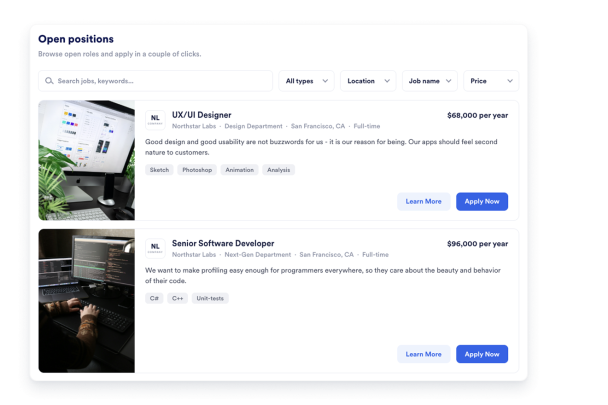

Customize a Job Board Visitors Can Search, Filter, and Apply From Hero Bg Image

How to embed Job Board Widget to WordPress

1Get your embed code

After customizing your Jform website widget, click Try it on your website for free, and copy the generated embed code.

2Open the page editor

Go to the WordPress post or page where you want to display the widget, then add a new block.

3Add a Custom HTML block

Select Custom HTML and paste your Jform Website widget embed code into the HTML field.

4Update and view

Click Update or Publish, then open the page to check your embedded widget.

Publish Structured Job Cards

Show every opening with the details candidates need to compare roles quickly. Each job card can display role titles, companies, departments, locations, salary text, descriptions, skill tags, logos, cover images, and application links.

Job fields include:

Job title회사Department위치Salary textSkill tags
Add Job Cards
Publish Structured Job Cards

Help Visitors Search and Filter Openings

Keep longer job boards easy to scan with keyword search and filters. Visitors can narrow openings by location, salary text, skills, contract type, company, department, or job name depending on the controls you enable.

Filter controls include:

Keyword searchLocation filtersSalary filtersSkill filtersContract typeDepartment filters
Add Search and Filters
Help Visitors Search and Filter Openings

Show Job Details and Application Actions

Keep job cards compact while still giving candidates room to review the full role. Popup details can show longer descriptions, salary information, skill tags, and clear Apply or Learn More buttons connected to your application links.

Application controls include:

Popup detailsLong descriptionsApply buttonLearn More buttonApplication links
Customize Application Actions
Show Job Details and Application Actions

Match the Widget to Your Website Design

Style your job board so it fits naturally into your careers page or hiring microsite. Adjust layout, width, columns, spacing, radius, card colors, text colors, buttons, shadows, and scoped custom CSS.

Style controls include:

Image card layoutGrid layoutCompact list layoutSalary list layoutAccent colors맞춤설정 CSS
Style Your Job Board
Match the Widget to Your Website Design