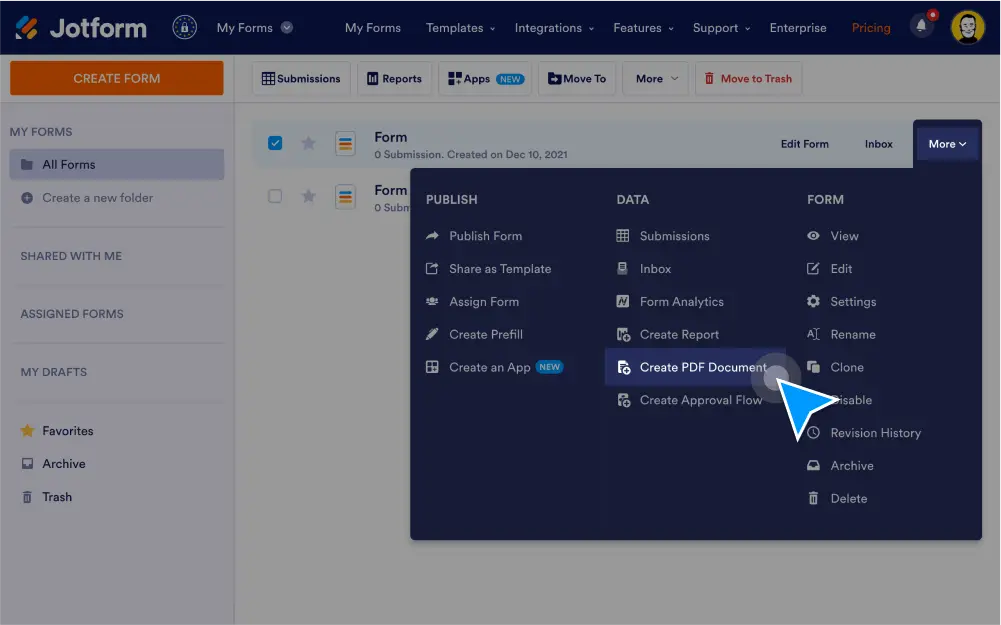
Generate PDFs for single or multiple form submissions. Customize your documents by updating existing form fields, adding new ones, and including optional — then share your PDFs with a link or as email attachments for others to download instantly.
양식 데이터를 PDF로 변환
양식 제출 데이터를 PDF 문서로 변환하여 사용자 정의하고 다운로드하고 다른 사람과 공유할 수 있습니다.
하나 또는 여러 제출자료에 대한 PDF 만들기
각각의 새로운 양식 제출자료를 자동으로 PDF 문서로 변환하거나 동시에 여러 제출에 대한 PDF를 생성하세요.
양식 필드 사용자 정의
드래그 앤 드롭으로 양식 필드를 업데이트하고, 레이아웃을 재정렬하고, 몇 번의 클릭만으로 가로 모드와 세로 모드 간에 전환할 수 있습니다.
새 양식 필드 추가
PDF 문서에 양식 필드를 추가하여 더 많은 정보를 수집하고 표시합니다.
링크로 PDF 공유
Send PDFs to others by copying and pasting each PDF’s unique link.
Share PDFs as email attachments
When someone fills out your form, automatically send them their submission as a PDF attachment with Jform’s email autoresponder feature.
Download submissions
Instantly download submissions as PDF documents or other common file types like Excel or CSV files.